How React Native actually runs.
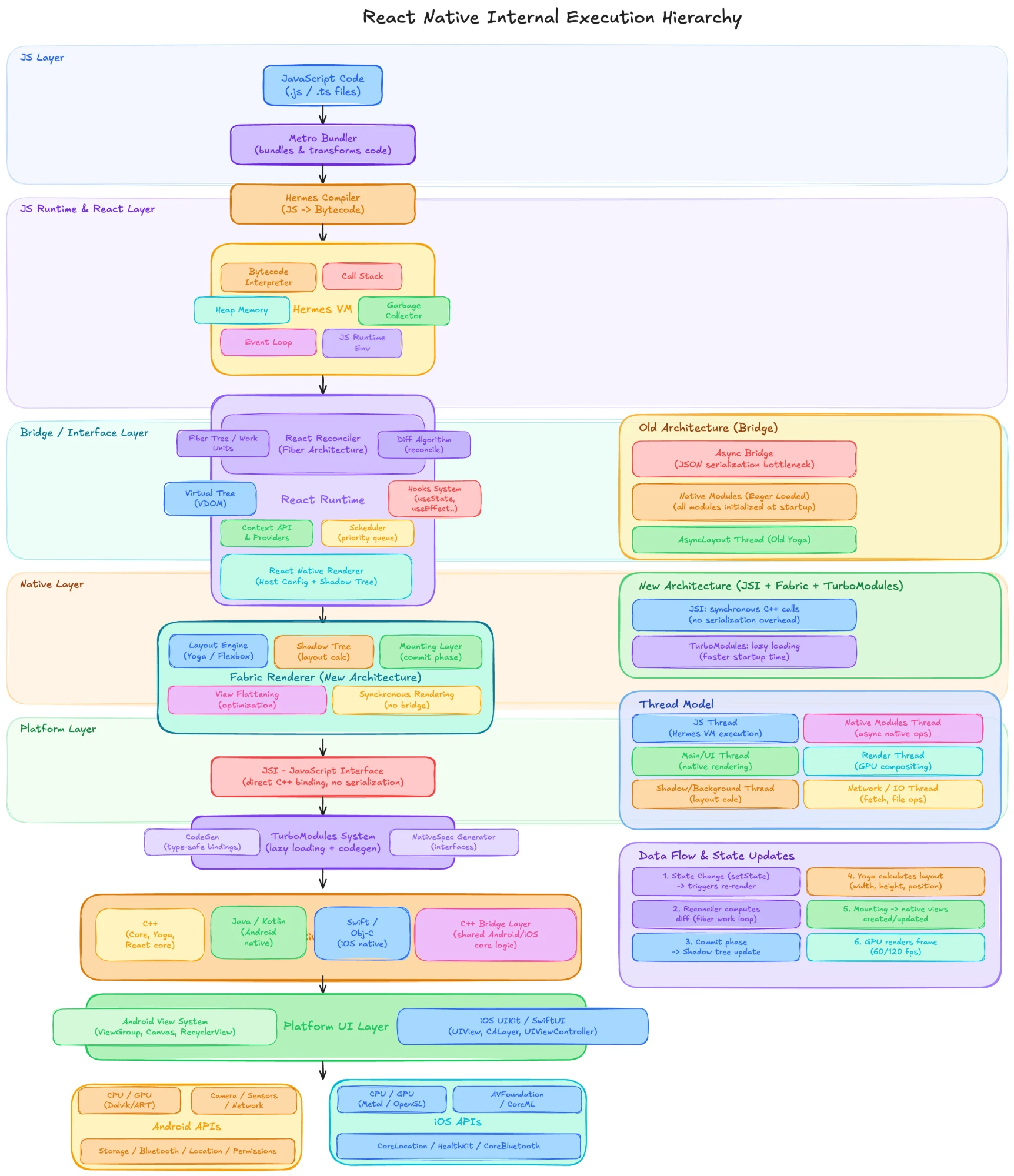
A React Native app is a stack of ten layers, from the TypeScript you write to the GPU that lights the screen. This essay descends through every one of them: what it does, why it exists, and how a single tap crosses all ten in less than a frame.
Scroll to descend. The model follows you, layer by layer.
01JS layer · Your code and Metro
Hundreds of files become one.
You write components across hundreds of .ts and .tsx files that import each other and dozens of npm packages. A phone cannot run any of that directly. The first stop is Metro, the bundler that ships with React Native, and it runs on your computer, not the phone.
- Resolve. Starting from your entry file, Metro follows every import and builds a dependency graph of every module the app can reach.
- Transform. Each module passes through Babel, which strips TypeScript types and turns JSX into plain function calls.
- Serialise. The graph is written out as one bundle, with every module wrapped so it can be required by number.
In development, Metro keeps the graph in memory and serves the bundle over HTTP. When you save a file it transforms only that module again and pushes it to the device, which is how Fast Refresh swaps a component while keeping its state.
RememberMetro's output is a single JavaScript file. Everything below this layer only ever sees that file.
02Build · Hermes compiler
Compiled before it ships.
A JavaScript engine normally receives source text, parses it and compiles it before running a single line. On a phone, that work would happen on every launch, on the slowest processor your users own. Hermes, React Native's default engine since version 0.70, moves the work to your build machine.
In a release build, the Hermes compiler, hermesc, turns the bundle into bytecode: compact, already-parsed instructions for the Hermes virtual machine. The app ships the bytecode, and at launch the engine maps it from storage into memory and starts executing.
- Faster start. No parsing or compiling on the device.
- Lower memory. Bytecode pages are loaded only as they are needed.
- Smaller download. Bytecode compresses well.
The trade is deliberate. Hermes has no just-in-time compiler, the part of browser engines that rewrites hot code into machine code while it runs. It optimises for start-up time and memory, which matter more on phones than peak speed in long-running loops.
RememberIn development, Hermes still runs your source directly. The bytecode step is what makes release builds start fast.
03Runtime · Hermes VM
One thread, one task at a time.
Inside the app, the Hermes virtual machine executes that bytecode. Five parts do the work, and the model shows them running.
- Interpreter
- Reads each bytecode instruction and carries it out.
- Call stack
- One frame per function that is currently running. A call pushes a frame; a return pops it.
- Heap
- Where objects, arrays and closures live once they are created.
- Garbage collector
- Finds objects nothing refers to any more and frees their memory. Hermes's collector, Hades, does most of that work on a background thread, so pauses on the JavaScript thread stay short.
- Event loop
- Takes the next task from the queue (a touch, a timer, a network response), runs it until the stack is empty, then runs any waiting promise callbacks before taking the next task.
Everything your JavaScript does shares this single thread: rendering, event handlers, state updates, parsing data. A loop that takes 50 milliseconds holds back every touch and every render queued behind it for those 50 milliseconds.
RememberWhen an app feels slow to respond, look at the JavaScript thread first. It can only do one thing at a time.
04React · Fiber reconciler
Deciding what changed.
React in a React Native app is the same library that runs on the web. Its job is to turn your components into a description of the interface and, when state changes, to work out the smallest set of changes to that description.
React keeps a tree of fibers, one per component instance. A fiber holds the component's type, its props, its hook state, and links to its parent, child and sibling. When you call setState, React marks that fiber as having pending work and schedules a render.
Rendering walks the tree one fiber at a time. Each fiber is a unit of work: beginWork calls your component and compares what it returns with the previous result, and completeWork finishes the fiber once its children are done. Branches with no pending work are skipped, which is why the List branch in the model is never visited.
Because the work comes in units, React can pause between them. When something more urgent arrives, such as typing into a field, the scheduler lets it run first and then resumes. startTransition and the other concurrent features are built on this.
All of this happens on a copy, the work-in-progress tree, while the current tree stays on screen. When the walk completes, the copy becomes the current tree in one step, so nobody ever sees a half-finished update.
RememberComponent type and key decide what React reuses. Same type and key: update in place. Anything else: unmount and mount fresh.
05Renderer · Shadow tree
Handing the result to C++.
React itself knows nothing about phones. A renderer connects it to a platform: react-dom for browsers and, for React Native, the renderer called Fabric. Its JavaScript side receives React's instructions (create this host component, set these props, append this child) and passes them through JSI into C++.
There, each host component becomes a shadow node: a C++ object holding the component's props, its layout and its children. Shadow nodes are immutable. A change never edits a node in place. Fabric clones the changed node and each of its ancestors up to the root, and the new nodes point at the untouched branches of the old tree.
In the model, one property changes deep in the tree. Three nodes are cloned; the other four are shared between the previous tree and the next.
Immutability lets several threads work at once safely. The UI thread can read the tree on screen while the JavaScript thread builds the next one, with no locks and no half-read trees.
RememberA shadow tree describes the interface; it is not the interface. No native view exists yet.
06Interface · JSI
From messages to direct calls.
JavaScript runs inside Hermes; the shadow tree, the layout engine and the device APIs live in native code. How the two sides talk is the biggest difference between React Native's old and new architectures.
Old: the Bridge
Every call from JavaScript to native code was serialised into a JSON message, queued, sent across the bridge in batches and parsed on the other side. Replies came back the same way.
- Serialising and parsing cost time on every message.
- Everything was asynchronous, so JavaScript could never get an immediate answer, such as the size of a view.
- Busy moments, such as scrolling a list while an animation runs, filled the queue and delayed everything in it.
New: JSI
The JavaScript Interface is a C++ API that lets the engine hold direct references to C++ objects and call their methods. A call from JavaScript runs native code straight away, synchronously or asynchronously, with nothing serialised in between. JSI also hides which engine sits underneath, so the same native code works with Hermes or JavaScriptCore.
Fabric and TurboModules are both built on JSI. That is why this model places it between React and everything below it.
In the model, the top lane is the Bridge, serialised and batched. The bottom lane is JSI, direct. Timing is illustrative.
RememberThe New Architecture has been React Native's default since version 0.76. Its foundation is JSI: everything else in it depends on calling C++ directly.
07Fabric · Render, commit, mount
From description to real views.
Fabric turns the shadow tree into native views in three phases. The phone in the model runs through all three.
- Render, on the JavaScript thread. React reconciles and creates the new shadow nodes through JSI. Nothing has a size or position yet.
- Commit. Yoga, React Native's layout engine, computes the x, y, width and height of every node with Flexbox rules, the same model as CSS. The finished tree is then promoted as the next tree to mount. Layout can run on a background thread.
- Mount, on the UI thread. Fabric compares the new tree with the one on screen and produces mount instructions: create, delete, insert, remove, update. The platform carries them out on real native views.
View flattening
Many views exist only to arrange their children: a row, a padding wrapper, a centring container. If a view has no background, no border and no event handlers, Fabric leaves it out of the native hierarchy while it compares the trees, and positions its children directly instead. Fewer native views means less memory and faster drawing.
Because the core is shared C++ that JavaScript can reach synchronously, Fabric can also render on the UI thread when an update is urgent, and it supports React's concurrent rendering.
RememberRender decides what. Commit decides where. Mount makes it real.
08Modules · TurboModules and Codegen
Loaded only when called.
Native modules give JavaScript access to what the platform provides: the camera, storage, location, the keychain. The old architecture created every one of them when the app started, whether anyone used them or not. An app with fifty modules paid for fifty at launch.
TurboModules are created on first use. JavaScript holds a JSI reference to a lightweight stand-in; the first call loads the real module, and later calls go straight to it. Start-up cost now depends on what the first screen needs, not on everything the app could do.
Codegen
Each module declares its interface, its spec, in a typed TypeScript or Flow file. At build time, Codegen reads the spec and generates the C++ code that connects JavaScript to native. If the two sides disagree about a type, the build fails instead of the app crashing in front of a user.
RememberLazy loading improves start-up. Codegen moves type errors from runtime to build time.
09Native · C++, Kotlin, Swift
One core, two platforms.
Below the frameworks is the code that actually runs on each device. Most of the machinery in this essay (Hermes, JSI, Fabric's core, Yoga and the TurboModule system) is C++, compiled for each platform and shared between them. That shared core is why the same layout produces the same result on Android and iOS.
Around it sit thin platform layers: Kotlin and Java on Android, Objective-C and Swift on iOS. They create the real views, forward touches into the core, and wrap the platform APIs that modules expose.
Your own native code can follow the same pattern. A module written in C++ runs on both platforms from one source. A module that needs a platform API is written twice, once per side, behind one shared spec.
RememberWhen something behaves differently on Android and iOS, look first at the thin platform layer, not the shared core.
10Platform · Views, GPU, hardware
Pixels, at last.
Mount instructions end as real platform views: View and ViewGroup on Android, UIView backed by CALayer on iOS. From there the operating system takes over. It draws each view into layers, and a dedicated render thread (RenderThread on Android, the Core Animation render server on iOS) composites those layers on the GPU into a single frame.
Each frame has a budget: 16.7 milliseconds at 60 Hz, 8.3 milliseconds at 120 Hz. Miss it and the previous frame stays on screen for another cycle, which the eye reads as a stutter.
This is also where the device itself lives: the camera, sensors, Bluetooth, location and storage. JavaScript reaches every one of them the same way: through a module, through JSI, into platform code at this layer.
RememberReact Native views are real native views. There is no web view and no canvas in between.
11Threads · Who does what, and when
Five threads, one frame.
The layers run on separate threads, and most performance problems come from one thread doing work that belongs to another.
- JavaScript thread
- Hermes runs your code here, and React renders here.
- UI (main) thread
- Touches arrive here, mount instructions run here, and natively driven animations advance here.
- Background thread
- Fabric can run layout and other tree work away from the main thread.
- Render thread
- The platform composites each frame on the GPU.
- Module and I/O threads
- Network requests, file access and asynchronous module work.
In the model, the JavaScript thread is stuck in a 50 millisecond task. Frames keep arriving on the UI thread because the animation runs natively, through the Animated API's native driver or a library such as Reanimated. An animation driven from JavaScript would freeze for those frames.
RememberKeep the JavaScript thread for decisions. Move continuous work, such as animations and gestures, to the UI thread.
12End to end
One tap, every layer.
Here is the whole journey for a single tap on an Add to cart button, traced through the stack.
- Touch. The screen reports the touch to the UI thread, which hands it to JavaScript as an event.
- setState. Your handler updates state; React marks the fiber and schedules a render.
- Render. React reconciles on the JavaScript thread and creates new shadow nodes through JSI.
- Commit. Yoga lays out the changed nodes and the new tree is committed.
- Mount. Fabric compares the trees and the UI thread updates the native views.
- Frame. The render thread composites the new layers on the GPU, and the cart badge shows 1.
At 60 Hz, all of this has 16.7 milliseconds if the change is to appear on the next frame. Usually it fits easily. When it does not, these six steps tell you where to look.
13The model
The whole stack in five lines.
- Metro and
hermescprepare your code before it reaches the phone. - Hermes runs it on one JavaScript thread, one task at a time.
- React decides what changed, and Fabric's shadow tree records it in C++.
- JSI lets JavaScript call C++ directly. Fabric and TurboModules are built on it.
- Yoga lays it out, the UI thread mounts it, and the GPU puts it on screen.